1. Which observation or observations will be selected by the following WHERE statement?
[WHERE statement 에서 대소문자 구분] (d)


- a 라고 답해서 틀림.
- Expressions in the WHERE statement are case-sensitive.
- This WHERE statement returns only those values that contains the exact character string shown,
- and the position of the substring within the value is not important.
- WHERE 문은 대소문자를 구별함을 주의 !!
2. Which statement in a PROC SORT step prepares data to be displayed as shown in this output?
[PROC SORT 문]
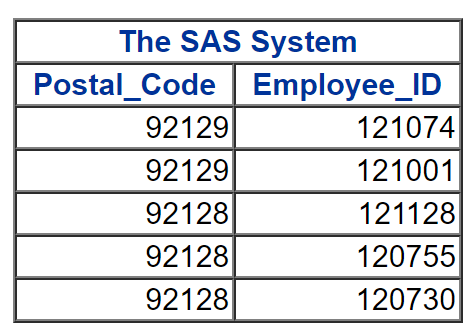
by descending Postal_Code
descending Employee_ID;
- The BY statement must specify the keyword DESCENDING before each variable.
3. Which statement about this PROC SORT step is true?
[PROC SORT statement 문법]

- A semicolon should not appear after the input data set name.
- This PROC SORT step has a syntax error : a semicolon in the middel of the PROC SORT statement.
- error 를 고치면 다음과 같다 : proc sort data = orion.staff out = work.staff;
- PROC SORT statement 문법 -
proc sort data= a out=b;
by a;
run;
4. Which of the following statements selects from a data set only those observations for which the value of the variable Style is RANCH, SPLIT, or TWOSTORY?
[WHERE 문에서 IN 연산자] (d)

- In the WHERE statement, the IN operator enables you to select observations based on several values.
- You specify values in parentheses and separate by spaces or commas.
- Character values must be enclosed in quotation marks and must be in the same case as in the data set.
5-1. When you run this code, which title or titles appear in the last PROC PRINT output?
[Title]★ (a)


- c 로 답해서 틀림.
- The TITLE statement in the last PROC PRINT step changes the first title line and cancels all previously specified titles with line numbers higher than one. ★
- 가장 마지막 PROC PRINT step 에서의 TITLE 문은 첫번째 title line 을 바꾸고, 이전에 지정한 모든 title을 취소한다 !!
5-2. Suppose you already ran the first program, which created a one-page report. Next, you want to run the second program. What will appear at the top of the second report?
[Title] (a)

6. Which program creates the output shown here?
[PROC PRINT 문의 LABEL option 또는 SPLIT option] (b)

- To display temporary labels in PROC PRINT output,
- you must specify either the SPLIT= option or the LABEL option in the PROC PRINT statement. ★
7. Which BY statement is valid for this PROC PRINT step?
[data set 정렬에 대해] (d)

- You can group by Gender because Gender is the first variable that the data set is sorted by.
- You could also group by Gender and then Start_Date because the data set is sorted by these variables in the same order.
- You cannot use the other BY statements because the variables are not specified for grouping in the same order that the data set is sorted.
8. Suppose you already ran the first program, which created a one-page report. Next, you want to run the second program. What will appear at the top of the second report?
[BY를 사용하려면 데이터가 정렬되어야 함, LABEL statement] (b)


a. This program will run correctly only if orion.sales is sorted in ascending order by Country. (X)
- The input data set must be sorted by Gender, the variable specified in the BY statement.
b. Annual Salary will be displayed at the top of the Salary column. (X)
- The label Annual Salary will not be displayed
- because the LABEL option is not included in the PROC PRINT statement. ★
- PROC PRINT 문에 LABEL option 이 지정되지 않았기 때문에 label은 보이지 않는다.
'자격증 > SAS BASE' 카테고리의 다른 글
| Chapter 5. Reading SAS Data Sets (0) | 2023.01.06 |
|---|---|
| Chapter 4. Formatting Data Values (0) | 2023.01.04 |
| SAS 관련 정리 (2) | 2022.12.25 |
| Chapter 16. Creating Output (0) | 2022.12.22 |
| Chapter 14. Using Function to Manipulate Date (0) | 2022.12.20 |


